Heart Bound Font Review
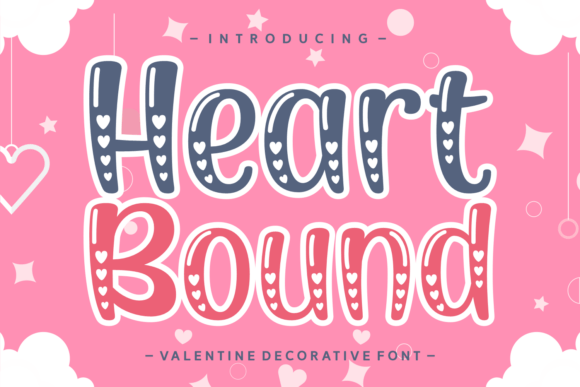
As a web designer, I often find myself searching for the perfect typeface to elevate a project’s visual identity. Heart Bound has quickly become one of my go-to fonts for creating romantic, warm, and expressive digital experiences. Its delicate curves and soft flourishes make it ideal for brand elements that need a personal touch without sacrificing clarity.
Testing Heart Bound in a Hero Section
I first tested Heart Bound in a hero section for a boutique online store selling handmade jewelry. The font’s organic flow and elegant swashes added a sense of luxury and intimacy to the headline. When placed over a muted background image, it felt like a whisper of love rather than an overwhelming statement. It worked especially well when paired with a clean sans serif for the subheading, creating a balanced contrast between the decorative and the functional.
Responsive Design and Mobile Usability
On mobile devices, Heart Bound maintained its charm without becoming too ornate. I noticed that on smaller screens, the font still held its legibility, especially when used at larger sizes for headings. However, I wouldn’t recommend using it for body text or small buttons, as the intricate details can get lost in pixelation. For best results, keep it reserved for titles, CTA buttons, and key branding elements.
Using Heart Bound in Digital Branding
Heart Bound is a great choice for brands looking to convey warmth, authenticity, and a personal connection. I’ve used it in logo designs for wedding planners and lifestyle coaches, where the font’s softness aligns perfectly with the brand’s mission. It also works well in social media graphics, especially for posts that aim to evoke emotion or highlight special occasions.
Font Pairing for Web Projects
When working with Heart Bound, pairing it with a simple, modern sans serif like Roboto or Lato helps maintain readability without clashing with the font’s personality. For editorial-style websites, a classic serif font like Georgia or Playfair Display can complement Heart Bound’s elegance. The key is to use it as a focal point rather than a background element.
Heart Bound in Landing Pages and Calls to Action
In a recent project, I used Heart Bound for a landing page headline promoting a self-care course. The font’s flowing style made the message feel inviting and approachable. When combined with a bold color and a strong image, it created a visually cohesive experience that encouraged visitors to engage. For CTA buttons, I kept the text short and used a solid background to ensure the font stood out clearly.
Considerations for Web Use
While Heart Bound excels in display roles, it’s not suited for long paragraphs or dense text blocks. Its decorative nature makes it less ideal for accessibility-heavy interfaces or content-heavy pages. If you’re designing for a site with a lot of text, consider using Heart Bound only for headers, titles, or decorative accents.
Checking Webfont Availability and Licensing
Before integrating Heart Bound into any website, I always check the licensing terms. It’s important to confirm that the font is available in webfont formats like WOFF or WOFF2 and that it includes the necessary weights and styles for your design needs. Also, verify that it supports multilingual characters if your audience spans different regions.
Heart Bound for Online Stores and E-commerce
For an online store selling handmade candles and bath products, Heart Bound added a touch of sophistication to product banners and category headings. It worked particularly well on product pages where the font was used to highlight scent names or special offers. The font’s romantic flair aligned with the brand’s aesthetic, making it a valuable addition to the design system.
Final Thoughts on Heart Bound
Heart Bound is a beautiful, expressive font that brings warmth and personality to digital projects. Whether you’re designing a wedding website, a boutique e-commerce store, or a creative portfolio, it can add a unique touch that resonates with your audience. Just remember to use it strategically, pair it wisely, and always test it across different screen sizes and backgrounds to ensure it performs as expected.